

If GPT-6 Astra usage limits interrupt a task, I would first check what I asked it to finish. Turning four notes into a table and investigating a calculation bug need different inputs, instructions and checks.
The four-row card below gives you a way to plan that next request. It covers the result, the needed information, a tentative starting setup and the point where work should stop or be reconsidered.
Both examples are fictional. They illustrate task planning, with no measured Astra usage savings or evidence for choosing a subscription.
What GPT-6 Astra usage limits can tell you
Check your account’s current allowance before planning more work. OpenAI’s pricing and usage guidance explains where to find it and describes message ranges as estimates.
The model, task size, complexity and context affect usage. Local messages and cloud chats share an allowance. Speed settings can also raise consumption. A count of requests alone leaves out those differences.
That gives me a reason to inspect the work attached to each request. It does not tell me how many more tasks my account can complete. Use the current account display for that limit, including any reset information it provides.
For the request itself, start with something you can inspect at the end. My AI agent workflow guide covers checking each step. Here, the check begins before you choose the model and effort for a task.
Copy the four-row task card
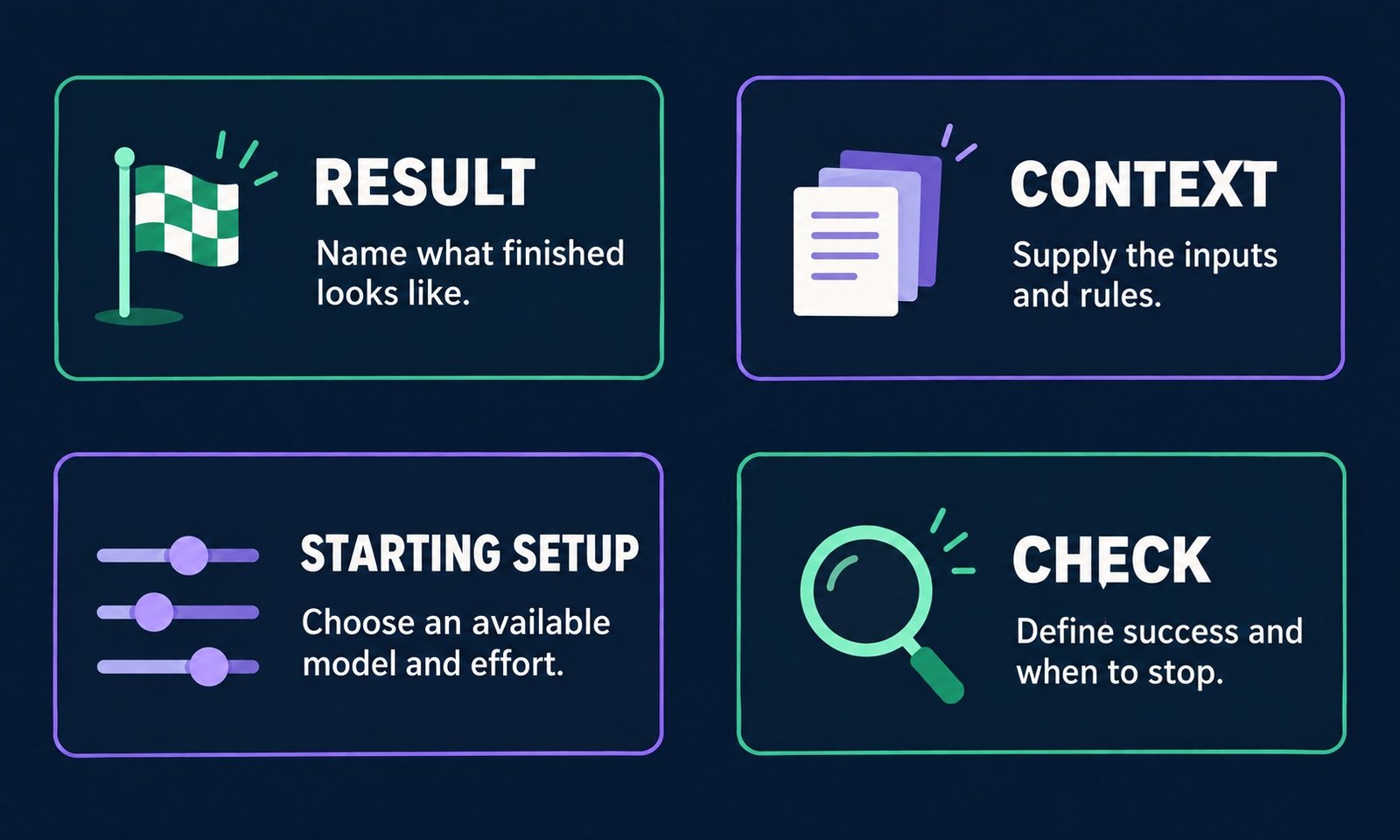
Write one short answer on each row. You can paste this card into a plain note and fill it in before sending your request.
Task and difficulty: What finished result do I need, and what makes it difficult?
Necessary context: Which inputs and rules does this task require?
Tentative starting setup: Which available model and effort would I try first?
Stop or reconsider: What would show success, missing information or a need for review?
The first row describes the result. A table with three named columns is clear enough to inspect. A request to improve the whole business leaves the assistant to decide what work belongs in the task.
The context row lists the information needed to reach that result. Include relevant instructions and approval boundaries. If an order calculation depends on a discount rule, that rule belongs in the request even if leaving it out would make the prompt shorter.
OpenAI’s September 11 guidance on Astra skills and prompts recommends loading relevant guidance and defining completion. My card turns those ideas into a small planning exercise.
The third row is a starting choice you can reconsider. The fourth gives you a reason to stop, ask a question or change that choice. Neither row needs a promise about the number of tokens the task will use.
Here, effort means a model setting related to how much reasoning it can use. Available choices depend on the product. OpenAI’s Astra API model page lists low, medium, high, xhigh and max for the API.
That list does not establish the controls in your Codex desktop app. Use the choices actually available in your environment. This article does not walk through a particular desktop menu or rank those levels by cost per successful task.
Example one: turn four notes into a table
For a small extraction job, the supplied list and required columns may be all the task needs. Here is the fictional input.
draft outline / Maya / Friday
check three links / Leo / no date
export diagram / Maya / Thursday
review final copy / Leo / Friday
The task card keeps the request narrow.
Task and difficulty: Make a task, owner and due-date table. Four supplied items, easy to check by hand.
Necessary context: Only the four notes above and the three column names. Leave missing dates blank.
Tentative starting setup: Consider an available smaller model or lower effort, then inspect the result.
Stop or reconsider: Four rows, each item once, one blank date and no invented tasks or dates.
I would turn that into a direct request.
Using only the four fictional notes above, make a table with task, owner and due date. Leave missing dates blank. Include each item once. Do not add tasks or infer calendar dates. Finish after the table.
The expected table is shown below. It is a reference answer prepared for the example, not a recorded Astra response.
| Task | Owner | Due date |
|---|---|---|
| draft outline | Maya | Friday |
| check three links | Leo | |
| export diagram | Maya | Thursday |
| review final copy | Leo | Friday |
The blank cell is part of the answer. Filling it with Friday would create a fact that the input never supplied. If an assistant does that, the useful correction is to point out the invented date and restate the rule.
There is no need to inspect a calendar or search project folders to complete this example. Once the four rows match, the task has reached its stated end. A longer explanation would not add a missing deliverable.
Choosing a smaller model or lower effort here is a tentative approach. This example contains no model comparison, measured consumption or proof that one setting will always produce the right table.
Example two: review one order-total calculation
A calculation review needs a precise rule before a model choice is useful. For this example, a deliberately broken toy function includes cancelled orders, subtracts the discount for every order and rounds each order before adding the amounts.
The intended calculation excludes cancelled orders and subtracts one fixed-dollar discount from the combined active total. It floors a negative result at zero, then rounds once to cents. An exact half-cent rounds up. These are the rules for this toy only.
Task and difficulty: Review one toy order-total function and propose a limited correction. Check how the rules interact.
Necessary context: The function, synthetic inputs, cancellation rule, one fixed-dollar discount, zero floor and final half-up rounding.
Tentative starting setup: Try an available reasoning-capable model and effort suited to examining the failure.
Stop or reconsider: The correction meets the supplied checks. Clarify missing rules and label checks that were not run.
The next request can be specific about both the change and its boundary.
Review this isolated toy order-total function using the supplied examples and rules. Propose a correction limited to this function. List the expected checks and distinguish checks you ran from checks you only proposed. Use no network calls or production data.
Use three synthetic order amounts and a $5.000 discount. The extra decimal places deliberately expose rounding behavior. They represent intermediate amounts in a teaching example, not ordinary displayed shop prices.
| Order | Status | Amount in dollars |
|---|---|---|
| A | active | 19.995 |
| B | cancelled | 100.000 |
| C | active | 3.340 |
Leave order B out. The two active amounts add to 23.335. Subtract the discount once to get 18.335. Rounding half up at the end gives the expected total of $18.34.
The prepared broken function returned $108.34 in the local Python check. The prepared correction returned $18.34. Both implementations were created for this explanation. Neither is a recorded Astra answer or evidence of a winning model setting.
One mixed case can hide why a correction works. Separate inputs make each rule easier to inspect.
- Cancellation check. Active $10.00 plus cancelled $100.00, with no discount, should give $10.00.
- Discount check. Two active $10.00 orders with one $5.00 discount should give $15.00.
- Rounding check. Two active $0.005 amounts with no discount should give $0.01. Rounding each amount first would give $0.02.
- Zero-floor check. Active $3.00 with a $5.00 discount should give $0.00.
The local Python checks covered eight valid-input cases, including empty input, all-cancelled orders and an ordinary exact-cent total. The prepared correction matched all eight expected answers. That checks this toy’s arithmetic, not real checkout behavior.
The example assumes valid, finite, nonnegative decimal inputs. It has no tax, shipping or payment rules and no input-validation layer. Those limits belong beside the result, so eight passing cases do not grow into a claim the checks never established.
When a failed result warrants another try
First identify what failed. An invented due date and an incorrect discount total need different corrections. Changing the model immediately can hide a missing rule that would confuse the next attempt too.
For the table, compare every row with the input. If a supplied task is missing, point to that item. If the output includes a guessed date, name the blank-cell requirement. The correction should refer to an observable mismatch.
For the function, preserve the failing input and its expected total. Check whether the request supplied all the rules the calculation needs. If the meaning of discount is unresolved, ask for that fact before accepting a fix.
If the inputs and checks are clear and the work still fails, a different available model or effort may be worth trying. Keep the same acceptance checks so you can see whether the new attempt actually meets the task.
Human review may also be the right next step. A toy total passing its examples does not authorize changes to a real checkout, and a prepared result does not expand the permissions attached to the task.
What this checklist leaves unmeasured
The examples give you requests and checks to inspect. They contain no timed Astra trials, quota measurements or comparison across models. They cannot establish a best effort level or whether a paid plan would be worthwhile for you.
Context also has a technical wrinkle. OpenAI’s prompt caching documentation explains that an eligible matching prompt prefix can reuse saved computation. New input still needs processing.
You cannot assume every earlier token is recomputed on every turn. You also cannot assume that staying in one conversation guarantees a cache hit. Those details prevent a simple prompt-length rule from becoming a reliable savings calculation.
A future comparison would need the same task inputs and acceptance checks, recorded model settings, observed usage and repeated attempts. Keep failed results too. One unusually short or successful run would be a weak basis for a general recommendation.
Give the next task a clear finish
Pick one pending request and fill in the four rows. Name the result, gather the information it needs, choose a tentative setup and write down the evidence that would end the task.
If you cannot finish a row, that is useful. You have found a missing input, unclear rule or undecided boundary before asking the assistant to work through it. Resolve that detail and send a request whose result you can check.
Sources last checked September 17, 2026. Product guidance comes from the linked OpenAI pages. The task card and fictional examples are explanatory material. No Astra usage saving, model benchmark or subscription recommendation is claimed.