
Switch AI tools.
Keep your work.
New AI tool. Same projects. Tandri keeps your saved project history, preferences and workflows in files you control.
Bring that context into a new chat or a compatible AI tool. Continue your website, your content plan or your next app without explaining the saved details again. Tandri’s Council challenges weak assumptions along the way.
Watch the 80-second demo ↓Keep the important details.
Keep your preferences and each project’s saved goals, decisions, work and next steps together.
Get a second opinion.
Council reviewers challenge the work. A Judge weighs their feedback and recommends what to change.
Take your progress with you.
Keep using the same Tandri files when you switch. Ask the next AI to read the relevant project and your preferences before continuing.
See what Tandri
helps us make.
Our website, articles, apps and YouTube videos are built with Tandri guiding the work. softDev23 directs and reviews it, using AI assistants and creative tools along the way.
These examples use our full working setup. Free Tandri gives you the project-memory and review foundation; specialist workflows and private business integrations are separate.

Read the finished work.
From research and drafts to the article, artwork and companion video.
Read the Jev article
Explore a real product.
Planning, building, reviewing and improving an app over many sessions.
Explore Habitual
Watch the workflow’s output.
A real episode shaped through research, scripting, production and review.
Watch the Jev videoThe same working system behind our wider business. We also use Tandri for graphics, motion demos, newsletters and social content.
How this relates to your Tandri download
These are examples of softDev23’s working system, developed over time, including its earlier AIOS name. Free Tandri provides the general foundation: project context, history, saved preferences and Council review. Specialist production workflows are separate packs.
You bring your AI account and any creative tools you choose. We use tools such as WordPress, ElevenLabs and Remotion, along with our own decisions and review. Your free download does not include our private projects or every business integration.
Built with Tandri, by softDev23
Used to build our business.
Now shared with you.
A REAL SEARCH-GROWTH CHECKPOINT
Months of work. A visible change.
We used our evolving workflow to research focused topics, publish useful articles, improve existing pages and connect related content. In September, our Search Console graph began to rise.
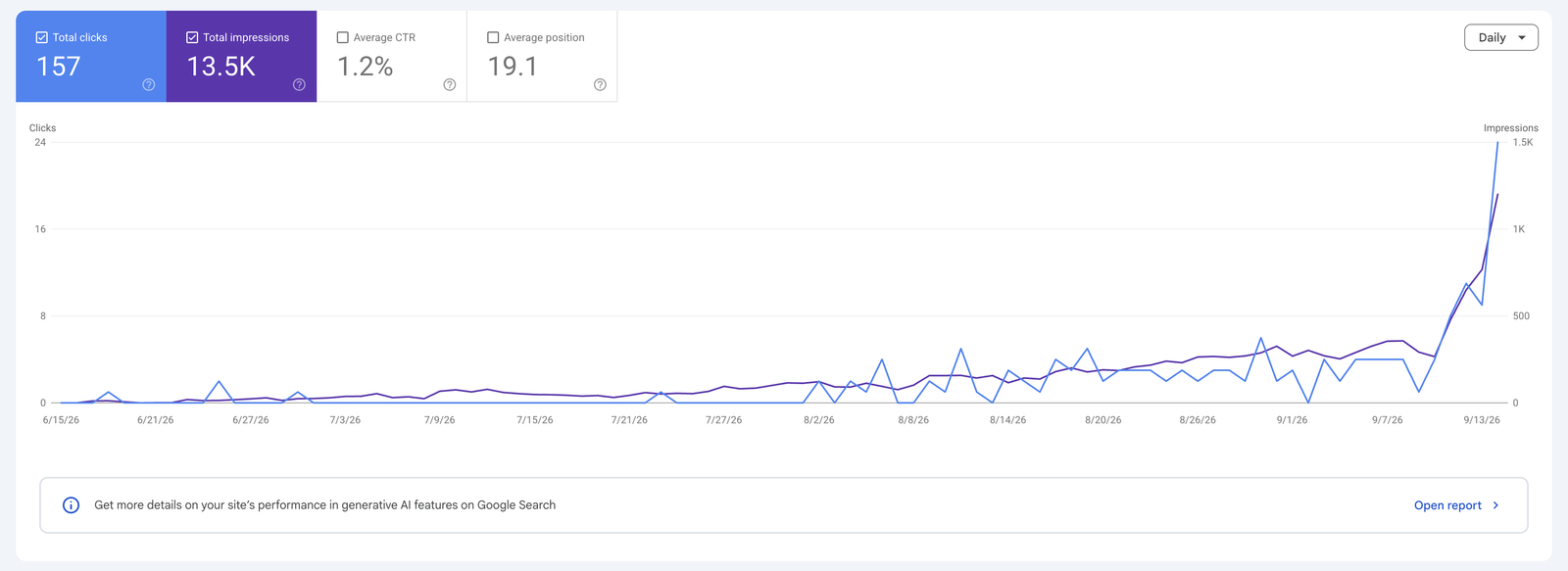
The useful part is the repeatable process: research → create → review → publish → measure → improve. A future Agentic SEO pack is planned to package that specialist workflow after it has been tested for customers.
A new AI tool.
The work you already put in.
Switching tools should not mean starting your website, content plan or app from scratch. Tandri keeps the context you save in one working folder, with a separate record for each project.
Our Mac prototype has demonstrated saving in Codex, continuing in Claude Cowork and bringing the updated work back. We are preparing that setup for customers.
Keep every project in its place.
Your website, app and research each keep their own saved progress, files and next steps. Choose the project you want to resume.
Keep how you like to work.
Your saved goals, preferred reply style and instructions are available for the next AI to read. You choose what goes in your profile.
Keep the decisions behind the work.
Saved decisions, reviews, dated notes and links to finished work explain what happened and why. Build on those records over time.
Keep the process that works for you.
Your saved workflow settings and personal methods stay with Tandri. The next AI reads them; tools and permissions need their own setup.
Save in one.
Continue in the other.
Save your work in Tandri. Give the next compatible AI access to the same folder. Ask it to read your profile and the project you want to continue, then check that it understands the next step.
More than
“That’s a great idea.”
AI can sound confident and still miss the problem. Tandri’s Council asks separate reviewers to challenge assumptions and check the evidence. The Judge weighs their findings and recommends the next step.
What could be wrong?
Reviewers look for missing details, weak reasoning and problems the first answer overlooked.
What supports the answer?
They compare claims with sources and your requirements. Confidence is not evidence.
What should change?
The Judge weighs the feedback: continue, improve the work or gather more evidence.
See the whole idea
in 80 seconds.
Watch a project take shape, get challenged, improve and continue in a new chat.
Read the video walkthrough
- Set up: Optional questions save how you like to work. In this fictional example, Sam wants to build a website and prefers brief answers.
- Create: Tandri helps create Weekend Walks, a small website with two fictional routes.
- Challenge: Separate Council reviewers examine the work. One confirms the route facts; another asks for clearer accessibility wording.
- Decide and improve: The Judge weighs both findings. Keep the supported facts and explain that accessibility has not been assessed. AI reviewers can still be wrong.
- Save: Keep the project context, decisions, changes and next unfinished step in files you own.
- Continue: Ask a new chat to read the same saved project. The illustrated continuation recovers revision 2 and the next check: mobile layout and keyboard navigation.
- Make it yours: Free Tandri includes the general workflow, profile, history, Council and Judge, tutorials and health checks. Tools and Obsidian are optional; specialist packs are separate.
Tandri works with your compatible AI tool; it is not a separate AI model or chat app. The free download is being prepared. Join the list for launch updates.
Save. Reopen. Continue.
Explain what you need
Work on your project with AI. Ask for a review when you need the answer challenged.
Save before you leave
Ask it to save what changed, the important decisions and the next unfinished step.
Pick up where you left off
Give the next chat access to the same Tandri folder. Ask it to read your profile, the relevant project and its saved workflow settings, then confirm the next step.
The useful parts.
Included free.
Saved context, a clear way to work and help getting started.
Your profile and history
Save how you like to work. Keep each project’s checkpoints, decisions, reviews and dated notes together, ready for the next chat.
A repeatable process
Explain, create, check, improve, save and continue. Start a “Loop session” when a task needs deeper planning and review.
Prompts and a practice run
20 starter prompts and plain-language commands help you begin. An optional tiny website tutorial teaches the cycle one step at a time.
Your own AI team
Use the optional team guide to map a coordinator and specialists, define their jobs and prepare clear handoffs. Start with one chat; expand when useful.
Health checks and updates
Check installation identity and supplied files. Review updates while preserving personal work; custom edits to supplied files trigger a conflict to resolve.
Custom methods and tools
Add your own workflows in personal files. Use the tools guide to plan optional connections. Browse and edit your notes in Obsidian if you like.
Free foundation.
Optional specialist packs.
General planning, Council review, history and customization stay free. Specialist workflows, starting with YouTube Production, will have separate offers when ready. Your AI account and any optional services are separate.
See each step.
Then try it yourself.
The download includes a seven-page illustrated guide: set up your profile, try the workflow, ask the Council, save your progress and continue in a new chat.
Clear instructions and copy-ready prompts help you get started without guessing what to do next.
Get notified when Tandri is ready →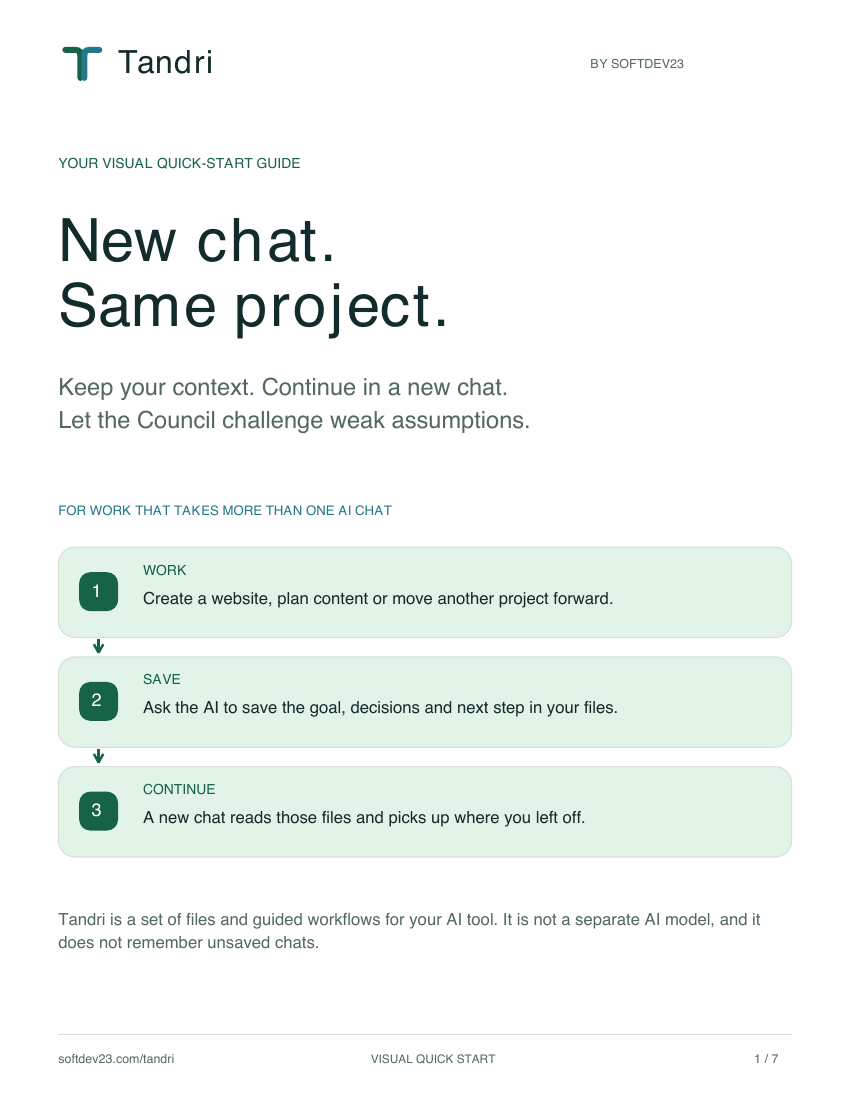
For work that takes
more than one chat.
Keep a website, research project, content plan and app organized in separate projects. Reuse your preferences while each project keeps its own history and next steps.
Tandri is a folder of files and a workflow, not another AI model. You still use your own AI account and decide what it may do.
The existing guided setup has been tested in Codex desktop on Mac. Our private Mac prototype also passes project handoff, profile and workflow-setting checks between Codex and Claude Cowork.
The simpler customer setup and final release checks are still in progress. Windows and other AI tools have not completed testing. Your AI account is separate; local file access is needed. Obsidian is optional.
Questions before you start
Does Tandri remember automatically?
Ask Tandri to save the work as you go. It keeps your profile and each project’s saved decisions, reviews, dated notes and next steps alongside your work. A new chat must read the relevant files. Review those records for accuracy; past conversations are not imported automatically.
Can I move between AI tools?
That is the goal: the same saved work, with your choice of AI. Codex and Claude Cowork have passed handoff checks in our private Mac prototype; the customer-ready setup is still being prepared. Use the same Tandri folder and ask the next AI to read the relevant files.
Does it move my whole chat account?
No. Tandri carries the information saved in its files, including your profile, project records and workflow settings. It does not automatically copy every conversation, provider memory, subscription, account connection or tool permission. Set up each AI tool’s access separately.
Do I need to be a developer?
You need to open a local folder in Codex and follow the setup prompts. The optional tiny website exercise teaches the workflow; you do not need to build a real website first.
What is free, and what costs extra?
The general Tandri system is free, including Council and Judge. Optional specialist packs will have separate offers when ready. Your AI subscription and any optional services are separate. Additional reviewers use your provider’s model capacity.
Does the team guide create agents for me?
It supplies roles, prompts and handoff templates. Actual agents and communication depend on your AI tool; the guide also explains manual copy-and-paste handoffs. It does not automatically create chats or connect accounts.
Will it give me more AI usage?
It helps organize work, keep replies focused and avoid repeatedly explaining context. It does not change provider usage limits or guarantee token savings.
What happens to my files?
They stay in your working folder. Share only what your task needs. Anything your AI reads is handled under that provider’s data practices.
Can I keep the Memory Kit I already downloaded?
Yes. Your existing Memory Kit files and promised download remain available. Tandri builds on the same save-and-continue idea with a broader working system.
Different AI. Same work.
Keep your projects, preferences and saved history together. Continue with a compatible AI tool, and let the Council challenge weak assumptions. Join for updates as we finish the free release.
Get Tandri launch updates