

Building an Obsidian AI workflow was not something I planned. It happened because I was tired of starting from zero every time I opened a new AI chat.
That sounds dramatic, but the problem was pretty normal. I would explain who I am, what softDev23 is, what I am building, what I do not want the AI to say, which apps matter right now, how I want writing to sound, and which rules should not be broken. Then I would do it again in another tool. Then again in another chat.
At some point, the obvious question was: why is all of this trapped in chat history?
So I built a small Markdown-based AI operating system inside Obsidian.
It is not fancy. That is the point.
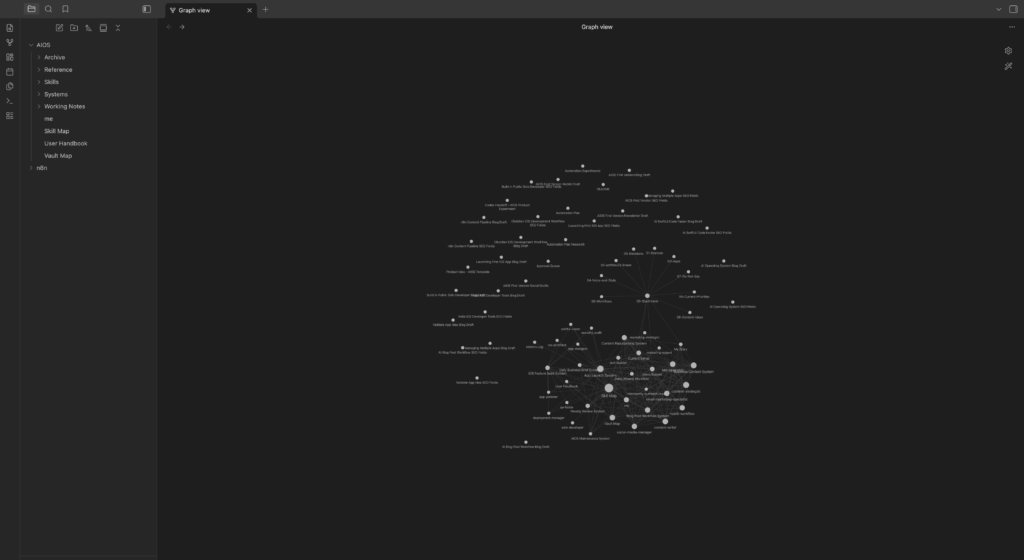
The folder sits inside Obsidian as a section of my existing vault. It contains a few core reference files, a set of reusable skills, a set of multi-step systems, and a Working Notes folder where AI-generated work lands before anyone reviews it. Every AI tool that works with this Obsidian AI workflow reads from the same folder instead of starting cold.
The first version is basically a set of notes that tells AI tools how to work with me, how to understand softDev23, which systems exist, which skills are available, and what rules should not be ignored.
The main lesson: an Obsidian AI workflow needs a source of truth
The biggest thing I learned is that AI workflows fall apart when the context lives everywhere and nowhere.
If one AI has memory, another AI has a project file, another AI has a pasted prompt, and another AI is reading a repo, the result gets messy fast.
The same basic facts start drifting:
- What is my brand called?
- What am I currently focused on?
- Which apps exist?
- What should never be published without approval?
- What should Reddit be used for?
- What tone should writing have?
- What should AI stop doing when tools are unreliable?
My first version of AIOS tries to solve that by making Obsidian the source of truth.
The vault is the memory.
AI tools are workers.
That framing helped a lot. Instead of treating every AI as the place where knowledge lives, the Obsidian AI workflow gives each tool something shared to read. I have since taken that idea further into a proper AI agent workflow, where the tools do not just read the context but carry out multi-step work against it.
The second lesson: rules need to be written down
Some rules feel obvious until an AI ignores them.
For example:
- Do not publish anything without approval.
- Draft first, approval second, publish last.
- Do not automate Reddit posting.
- Do not make softDev23 sound like a large company.
- Do not call me a veteran programmer.
- Do not use em dashes.
Those are not tiny preferences. They shape how the whole workflow should behave.
If they only live in my head, or inside one chat, they are easy to lose.
Writing them down in me.md, Vault Map.md, Skill Map.md, and User Handbook.md makes them much easier to enforce. It also makes it easier to catch when a skill or workflow conflicts with the core rules.
The third lesson: skills and systems are different
This was one of the most useful distinctions in building any Obsidian AI workflow.
A skill is one role.
For example:
- Content Writer
- SEO Specialist
- Reddit Workflow Specialist
- SwiftUI Coder
- QA Tester
A system is a multi-step workflow.
For example:
- Blog Post Workflow System
- Content Repurposing System
- Daily Business Brief System
- App Launch System
- AIOS Maintenance System
That separation keeps the AIOS from becoming one giant instruction blob.
If I need a blog post, I can use the Blog Post Workflow System. That system can pull in content strategy, SEO, writing, social drafting, Reddit drafting, and newsletter adaptation when needed.
If I only need a Reddit draft, I do not need the whole content machine. I can use the Reddit Workflow skill.
That makes the system easier to reason about.
The fourth lesson: working notes need a home
The first version also made it obvious that AI-generated work needs a designated place to land.
That is what AIOS/Working Notes/ is for.
It is not the permanent source of truth. It is the messy middle.
Drafts, experiments, plans, summaries, metrics notes, approval queues, and automation tests can live there while they are being reviewed.
This matters because AI can generate a lot of text very quickly. Without a holding area, useful drafts get mixed into permanent notes too early, or they disappear inside chat history.
Working Notes gives temporary work a place to exist without pretending it is final.
The fifth lesson: automation needs approval gates
The more I worked on the AIOS, the more obvious it became that automation should start boring.
Not powerful. Not fully automatic. Boring.
The safe version is:
- AI creates a draft.
- The draft goes into Working Notes.
- The Approval Queue records what needs review.
- I decide what happens next.
- Nothing public happens unless I explicitly approve it.
That is slower than a fully automated system, but it is much safer.
It also fits how I actually want to work right now. I want AI to reduce repetitive work, not quietly publish things, send emails, post to Reddit, or make business decisions while I hope nothing weird happens.
What the folder structure looks like
The core of my Obsidian AI workflow lives in a folder called AIOS inside my vault. Here is what is in it.
me.md is the identity file. It covers who I am, what softDev23 is, what I am building, what tone I use, and what rules should not be broken under any circumstances.
Vault Map.md is an index of what exists in the vault and where things live.
Skill Map.md is a list of every skill file and what job it does.
User Handbook.md is a short set of preferences and rules that apply to all AI work.
Skills/ contains individual role files. Content Writer, SEO Specialist, SwiftUI Coder, Reddit Workflow Specialist, and others. Each one defines a single job.
Systems/ contains multi-step workflow files. Blog Post Workflow System, App Launch System, Content Repurposing System, and others. Each one defines a repeatable process.
Reference/ holds background material. App details, business context, the Ideas Bucket for blog topics.
Working Notes/ is where drafts, experiments, plans, metrics notes, and the Approval Queue live while work is in progress.
None of those files are long. Most of them are one to three pages of plain Markdown. The point is not the files themselves. The point is that every AI tool working with this system is reading from the same source.
What worked
The first version of this Obsidian AI workflow already made the workflow clearer.
It now has:
- A clear identity file.
- A vault map.
- A skill map.
- A user handbook.
- Reusable skills.
- Repeatable systems.
- A Working Notes folder.
- A Metrics Log.
- An Approval Queue.
- An Automation Experiments log.
The useful part is not that any one file is impressive.
The useful part is that the pieces now have jobs.
What still needs work
The first version is not finished.
Some skills were imported from older prompts and still need cleanup. Some are too specific to one app. Some mention tools or workflows that may not be current anymore.
The automation plan is also being tested in small steps.
The first manual pipeline test is done. One idea became a blog draft, SEO fields, social drafts, a Reddit draft, and a newsletter draft — all sitting in the Approval Queue waiting for review before anything public happens.
That worked better than expected.
This Obsidian AI workflow connects to the rest of the solo dev process. If you want to see how AI tools extend into actual app development, I covered how I built iOS apps using AI coding agents in a separate post.
The next step is a small automation proof of concept using n8n. Not a big all-in setup. One workflow, one approval gate, one useful result. Build only what reduces friction.
What I would do differently
I would not start by trying to make the system perfect.
The better approach is to make it useful, then clean up what actually causes friction.
A good AIOS should not become a hobby project that eats the work it was supposed to support.
The point is to help me build apps, write useful content, track what matters, and avoid repeating the same setup work every time.
If the system creates more work than it saves, it needs to be simplified.
The other thing I would do differently is name files for what they actually are. Early versions of some skill files had vague names. That made them harder to reference and easier to ignore. A file called content-writer.md that has a clear job description is more useful than a file that tries to cover three different roles at once. One file, one job.
Final thought
The first version of my Obsidian AI workflow is basically a local operating manual for AI-assisted work.
It tells AI tools:
- Who I am.
- What softDev23 is.
- Which rules matter.
- Which workflows exist.
- Where drafts should go.
- What needs approval.
That is not glamorous, but it is useful.
And for this kind of system, useful beats clever.
If you are using AI tools for real work, write down the context you keep repeating. Even a small Markdown folder in Obsidian can be better than explaining your whole setup from scratch every time.
If you want to follow the full journey, the building in public posts show how this Obsidian AI workflow fits into a bigger solo dev picture.